Twitter For Professional Development 

If you haven’t tried Twitter for your professional learning, I highly recommend you explore it. There are so many people that provide great insight. 

Unlike other social media sites, users must be succinct in their posting. 160 characters are all that are allowed. Getting to the point is imperative. 

What point do you want to make about your profession? Or your take on educational matters? How about your favorite tech tool?

Explore Twitter for Professional Development. It opens an entirely new world. #TwitterPLN #educatorPD

Getting Started with Twitter

How Do You Organize?

Time is precious. With so many tools available, how do you know what tools will work best for you? Here are a sampling of tools that could help you save time and hassle. Just explore to find the right ones for you.

These are some of my “Go-To” apps. Give them a few weeks and see if they improve your workflow. If they don’t, then they should not become part of your digital toolbox. Enjoy!

Ad Block Plus: https://adblockplus.org/

Add This: http://www.addthis.com/browser-extensions/bookmarklets

Bit.ly: https://bitlysupport.desk.com/customer/portal/articles/2120973-tools?b_id=5612

Diigo: https://www.diigo.com/tools/diigolet

Symbaloo: http://blog.symbaloo.com/bookmarker-en/


Lenovo L450 Not Connecting?

The Wake County Public School System (WCPSS) in Raleigh, NC purchased the Lenovo L450 laptop for every certified teacher in the District. Over 13,000 teacher laptops and thousands of individual school-purchased student laptops later, an important issue keeps coming up: “Why won’t my laptop connect to the wireless internet?”

Believe it or not, the solution is simple. There is an Airplane Mode key that can easily get pushed and the wireless radios get turned off. The secret lies in the F8 key. The F8 key turns the wireless on and off. Students quickly figure this out and staff sometimes press the key and end up turning it off.

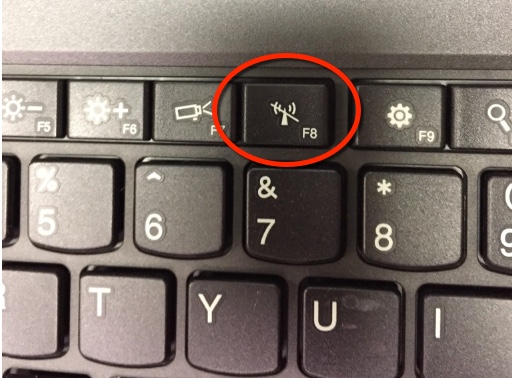
f7-wireless-key-l450

f8-key

When you press the F8 Key, you see the image below if your wireless is on. Green for ON (even though the word Off is below the pictures).

wirelesson

Red for OFF. If your wireless is OFF, you will see this:
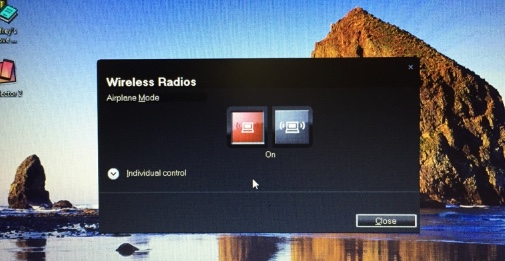
wireless off.jpg

The On and Off designation is for your Airplane Mode. Airplane mode turns off your wireless function. Seems a bit confusing and maybe it could be a little clearer. I feel as if it’s a little like a double negative in context.

Hopefully the next time that laptop won’t connect to the internet,  you’ll have a quick solution.

 

Summer Technology

What will your student do over the summer? Hopefully spend a lot of time playing and creating. But, don’t forget that a lot of learning can still happen while playing. If you are looking for some good apps to keep your children learning, look at this article from Common Sense Media Teachers’ Top Picks for Out-of-School Learning.

Common Sense media logo Common Sense Media rates, educates and advocates for kids, families, and schools.

Get reviews for age appropriate movies, games and books. Common Sense Media takes the guesswork out of your family choices!

Getting unusual popups on iPad or Mac?

One of my colleagues had one of these messages pop up on her school iPad. She wondered about it, not really worried, but still had a nagging thought about the threat. These scams have been landing in our inboxes ever since email was invented, but now they are showing up as popups in our browsers and on our screens.
Picture
My advice? Never click on a link or let these things scare you into clicking OK. Always check it out by searching for what is already out there for info. Apple support communities is always a good choice for the iOS or on other platforms, just search in your browser for the message or part of the message.
Another great place to look for the authenticity of an email or error message is to go to Snopes.com – Snopes provides the answers to whether something is a rumor or truthful.

Scientists have created a Google Maps for the human body

Technology advances faster than we can imagine! Google Maps for the body? Combined with 3D printed replacement parts, this will impact the health care industry greatly.

NC Music Educators Conference Coming Up!

I’m looking forward to seeing all of you again at the state conference in Winston-Salem. There is a great lineup of sessions scheduled. You can look at the conference sessions listing at: http://www.ncmea.net/conference-session-calendar.html. Lots of sessions that span multiple topics. Please stop by and say “Hello”!

Symbaloo and Discovery Education Network Spotlight

How do you save bookmarks in  your classroom? Do you save your own to your browser and then wonder where you put things? Although I use multiple methods depending on whether I’m saving for personal or professional or classroom use, one method has really made my job so much easier. If you need to share bookmarks with students or anyone else, Symbaloo is the way to go!

Check out my screencast on SymbalooEDU as I went “under the spotlight” as a Discovery Education Network Educator. SymbalooEDU or it’s professional version Symbaloo is a unique and visually appealing way to save and share bookmarks. 

Using Symbaloo in the Classroom

I have discovered a great way to guide the students in my music classes to use the websites that I need them to view. SymbalooEDU in combination with the DiscoveryEducation Network makes my classroom come alive! I use the Spotlight on Music series from McGraw Hill.  This is a great series, but I like to infuse real world things into the classroom.

So, I often search out YouTube videos and Discovery Education information to supplement the classroom content. When I find the right sites, I “bookmark” them using the really convenient Symbaloo browser add-on. Then I organize my tiles on Symbaloo so that my students can find them easily.

For the NC Musicians content for Grade 4, I have developed the following Symbaloo. Feel free to use it, copy it, or share it! http://www.symbaloo.com/mix/ncmusiciansandmusic

Symbaloo has become my new Teacher Assistant. My students can replay the videos at any time as long as they have an Internet connection. And I even use Symbaloo for the Student Links on my school’s website. Great tool!